
The right choice of LangGraph, CrewAI or AutoGen for production depends on your workflow, not on a ranking. Pick the one that passes your own tests for saved state, approval steps, tool permissions and tracing. Note that Microsoft has stopped adding features to AutoGen, so today the real comparison is LangGraph vs CrewAI vs Microsoft Agent Framework. Run all three through the same tasks before you commit.
This guide is for CTOs and lead engineers whose agent workflow needs an audit trail and human sign-off. It gives you the criteria, a way to test each framework fairly, and a check for when you don't need a framework at all.
What should a production agent framework need to support?#
A production agent framework has to save its state, pause safely for a person, limit what each tool can do, and leave a trace you can audit.
A demo only has to work once. Production has to keep working through restarts, timeouts, rejected approvals and misleading tool outputs. Check every candidate against these six things:
- Saved state. A run can survive a process restart and pick up from the last completed step.
- Explicit control. You can see and change the path a run takes, including branches and loops.
- Approval steps. A run can wait hours or days for a person, then continue with their decision.
- Tool permissions. Each step can reach only the tools and data it needs.
- Tracing. Every model call, tool call and decision shows up as structured telemetry.
- Exit cost. You can leave without rewriting your business logic.
Tool permissions come before features. In OWASP's 2026 ranking of LLM application risks, Excessive Agency rose from sixth to third. OWASP traces it to "excessive functionality, overly broad permissions, or too much autonomy." A framework that makes broad access easy is a risk, however good its demos look.
How do LangGraph, CrewAI and AutoGen differ in state, control and tooling?#
LangGraph gives you a graph you control directly, with saved state at each step. CrewAI adds Flows for control and approval on top of its agent crews. AutoGen is frozen, and new projects go to Microsoft Agent Framework instead.
LangGraph. A checkpointer saves the graph's state at each step, grouped into threads. Approval uses interrupt(): "When an interrupt is triggered, LangGraph saves the graph state using its persistence layer and waits indefinitely until you resume execution." The docs say to use a durable checkpointer in production. You also choose a durability mode, and the trade-off matters. In "async" mode, there is a small risk that a checkpoint isn't written if the process crashes.
CrewAI. Flows are the part of CrewAI that matters for control. CrewAI's @human_feedback decorator can pause a flow, show a person the output, collect their feedback, and route the flow based on the answer. Check the defaults: by default, @human_feedback stops and waits for input at the console. A non-blocking async mode exists. CrewAI's paid platform adds email-based review, but those features need version 1.8.0 or later and apply only to Flows, not to Crews.
AutoGen. Microsoft no longer develops AutoGen. The repository has shown a maintenance-mode notice since 2 October 2025, the last Microsoft release was autogen-agentchat 0.7.5 on 30 September 2025, and new users are sent to Microsoft Agent Framework, which reached 1.0 on PyPI on 2 April 2026. In Agent Framework, approval works by request and response: a workflow step sends a request to a person or system and waits for the answer before going on.
| Criterion | LangGraph | CrewAI | AutoGen → Agent Framework |
|---|---|---|---|
| Control model | Graph you define (nodes, edges) | Agent crews, plus Flows for step-by-step control | Group chats (AutoGen); workflows (Agent Framework) |
| Saved state | Checkpointers, with a choice of durability mode | Test how Flow state survives a restart | Checkpointing in workflows |
| Approval step | interrupt() and resume |
@human_feedback in Flows |
Request and response |
| Project status | Actively developed | Actively developed | AutoGen frozen; build on Agent Framework |
Take every cell as something to test, not a verdict. Each feature exists, but you won't know how it behaves in your setup until you run it.
How do you test each framework against the same task set?#
Build 10–20 tasks from your real workflow. Run them on every framework with the same model, prompts and tools. Then score the results against criteria you agreed before the first run.
Keep the framework as the only thing that changes. Put your tools behind one shared interface. An MCP server works well for this, because each framework then calls the same tool code. Pin the model version too, the same way you would when comparing LLMs.
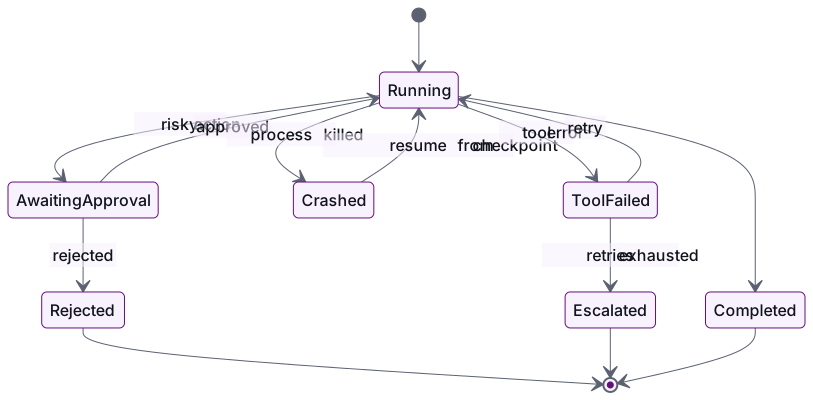
Your task set should include runs that go wrong on purpose:
- Normal run: the standard case finishes correctly.
- Approval rejected: the run stops cleanly and records why.
- Approval after 48 hours: the run resumes with the right state, on a different worker.
- Process killed mid-run: the run resumes from its checkpoint and doesn't repeat finished side effects.
- Tool error: the run retries a set number of times, then hands off to a person.
- Injected instruction: a tool result tells the agent to call an off-limits tool, and the call is blocked.
The worker test is a real risk, not a theory. In a GitHub discussion from November 2025, an Agent Framework user found that with several approval rounds, holding checkpoint state inside the framework, with no option to store it in a distributed cache, looked like a hard limit. That may have changed since. Your multi-worker test is how you find out.
Score each framework on:
- task success rate
- correct resumes
- approval bypasses (must be zero)
- how complete the traces are
- how much connecting code you had to write
- how long it took to add one new step
The last two show what owning the framework will cost you over time.
Which criteria matter most for audit trails and human approval steps?#
The criteria that matter most are where approval is enforced, whether it is tied to an exact action, and whether the record lives in a store you control.
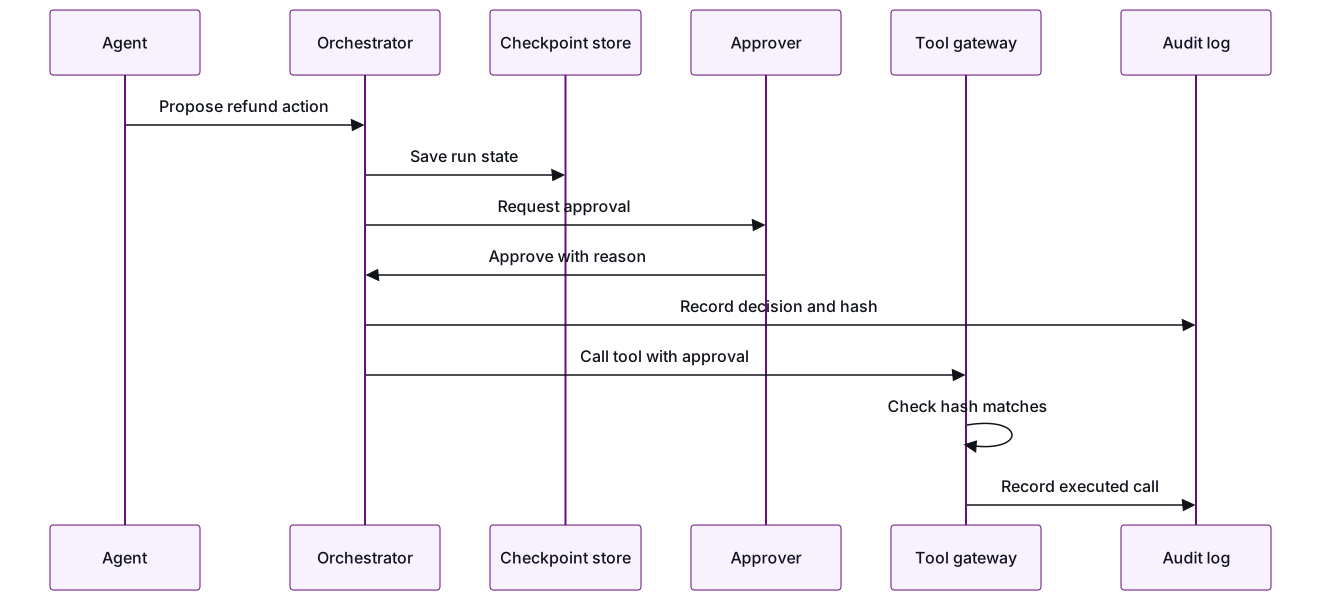
- Enforce approval in the tool layer. A prompt that says "ask before refunding" is not a control. The tool gateway should refuse a risky call unless it comes with a valid approval.
- Tie approval to the exact action. Store a hash of the tool name and its arguments with each approval. If the agent changes the amount after approval, the call fails.
- Record who, what, when and why. Log the approver, the timestamp, the evidence they saw and the decision. Write it to an append-only store, not just to the framework's checkpoint tables.
- Make side effects safe to repeat. Find out whether resuming re-runs any code before the approval point. Use an idempotency key so a resumed run can't send a payment twice.
- Use standard trace names. The OpenTelemetry generative AI conventions define names for model calls, tool calls and agent operations (agent spans). Use them so your traces don't depend on one framework's dashboard.
Calidad builds AI agents and automation this way: scoped permissions, a full audit trail, and a person on every risky action. Checking what the agent says before users see it is a separate job, covered in our guide to validating AI responses in production.
What are the risks of vendor lock-in and how do you limit them?#
The main lock-in risks are state formats tied to one framework, features available only on a paid platform, and the project being abandoned. You limit them by keeping business logic, tools and audit records outside the framework.
AutoGen shows that being abandoned is a real risk, not a theory. A framework with strong backing and a large user base still went into maintenance mode within two years. Plan for leaving on day one:
- Keep business logic in plain modules. Graph nodes or flow steps should only call your own functions.
- Keep tools behind your own interface or MCP, so switching frameworks doesn't mean rewriting the tools.
- Own the audit log. Checkpoint tables are internal to the framework. Your compliance record shouldn't be.
- Know which features need a paid platform. Email approvals or a hosted runtime may be worth paying for. Just write down which parts of your design depend on them.
- Keep the task set. It doubles as your migration test. A new framework is ready when it passes the same tasks.
How do you decide between a framework and custom orchestration code?#
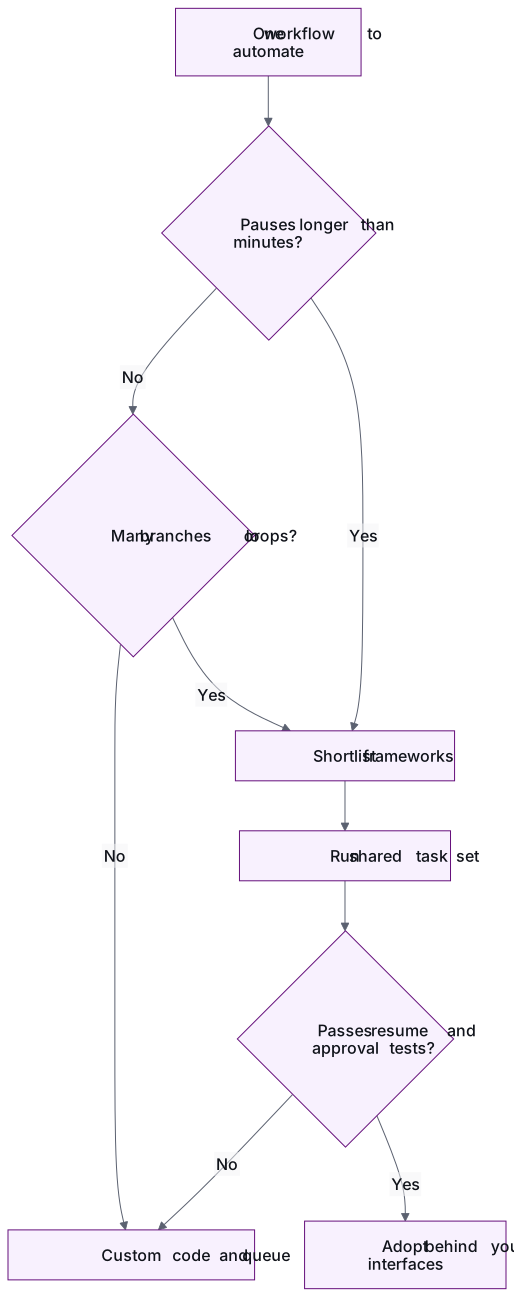
Use a framework when the workflow branches, loops or pauses for long periods. Use plain code when it is a short, fixed sequence with one approval step.
A three-step pipeline with one approval can run on a job queue, a database row for state and a small approval service. That's less to learn and less to upgrade. Frameworks earn their keep when you have many branches, retries, long waits and several agents, because then you would end up rebuilding checkpointing and resuming yourself.
Conclusion#
No framework wins in general. Write down the six criteria, build a task set from your real workflow, and run LangGraph, CrewAI and Microsoft Agent Framework through it with the model and tools held fixed. Choose based on zero approval bypasses, correct resumes and complete traces. Then keep your tools, logic and audit log outside the framework so you can change your mind later.
Calidad runs this kind of comparison as a paid pilot: one pod, one outcome, with success criteria agreed up front. Talk to an engineering lead →
Frequently asked questions
Is AutoGen still safe to use in production?
Existing AutoGen systems can keep running, but Microsoft is no longer adding features, and new users are directed to Microsoft Agent Framework. For new production work, test Agent Framework instead. If you already run AutoGen, plan a migration and use your task set to prove the new version behaves the same.
Can we combine frameworks, for example LangGraph for control and CrewAI for agents?
Yes, but every extra framework adds upgrades to track and another place where state can live. If you combine them, have one of them own the saved state and approvals, and keep tools behind a shared interface so neither framework controls access directly.
How long should a framework comparison take?
Long enough to run every task in your set, including crash and delayed-approval cases, on each framework. Keep the scope to one real workflow, not a platform-wide review. A narrow comparison with agreed pass/fail criteria tells you more than a broad one.
Does the framework handle agent security for us?
No. Frameworks give you building blocks such as approval pauses and checkpoints. Permissions, approval checks tied to exact actions and audit records are your design decisions. Enforce them in the tool layer and test them with injected instructions.
Which LLM should we use when comparing frameworks?
Use the model you expect to run in production, and pin its version so it is the same across all frameworks. If you haven't chosen a model yet, run a separate model evaluation first. Otherwise you can't tell whether a difference in results comes from the framework or the model.
- LangGraph
- CrewAI
- AutoGen
- Microsoft Agent Framework
- AI agents
- production AI
Newsletter
Get new articles by email
A short monthly round-up of what we've written on engineering pods, quality and AI. No spam.
