
There's no single best LLM for enterprise applications. The right model for you is the one that passes your own evaluation set, built from real user questions, at a latency and cost per request you can sustain. Its data-handling terms must satisfy your legal team, and you need a tested fallback for when the provider fails. Leaderboards are a starting point. Your own test results should decide.
Why is there no single best LLM for enterprise applications?#
What counts as "best" depends on your task, your data and your budget, and the market changes faster than any ranking can keep up with.
Three things make a universal answer impossible:
- Benchmarks test general skills, not your work. A public score tells you how a model handles exam-style questions. It says nothing about how it reads your contracts, support tickets or product catalogue.
- Prices move quickly. The Stanford HAI 2025 AI Index found that querying a model scoring at GPT-3.5 level on MMLU fell from $20 to $0.07 per million tokens between November 2022 and October 2024, a drop of more than 280 times. A choice based on last year's prices may already be the wrong one.
- Features differ. Tagging support tickets and drafting a contract summary have very different accuracy, speed and cost needs. One model is rarely the best fit for both.
What lasts isn't the model you pick. It's the method behind the pick: an evaluation set, a scoring rubric and a routing layer that lets you swap models without rewriting the product.
How do you build an evaluation set before choosing a model?#
Collect real questions, write down what a good answer looks like for each one, and score every candidate against them before anyone commits to a model or a final prompt.
This is the order our Generative AI practice follows: write the evaluation set from real user questions first, then choose the model and prompt. The steps:
- Gather real inputs. Use search logs, support tickets, chat transcripts and questions your sales or operations teams get. Remove personal data before anything leaves your environment.
- Cover the whole range. Include common questions, edge cases, questions the model should refuse, and questions about documents some users aren't allowed to see.
- Define "correct" for each item. Write down the facts the answer must contain, the source it should cite, what it must never say, and the expected format.
- Pick a scoring method for each type of question. Use exact match for data extraction. For open answers, use a rubric graded by reviewers or by an LLM judge that you spot-check against human grades. Add a grounding check that confirms the answer cites the right source.
- Hold some items back. Keep part of the set out of prompt tuning so your scores don't just reward overfitting.
- Version it with the code. Store it in the repository and run it on every change to a prompt, model or retrieval step.
Keep the first version small enough that your domain experts can review every expected answer. Then add to it each time production turns up a failure. The NIST Generative AI Profile (AI 600-1) is a useful checklist here. It names 12 generative AI risks, including confabulation and data privacy, and each one can become a category in your set.
How should you weigh accuracy, latency and cost per request?#
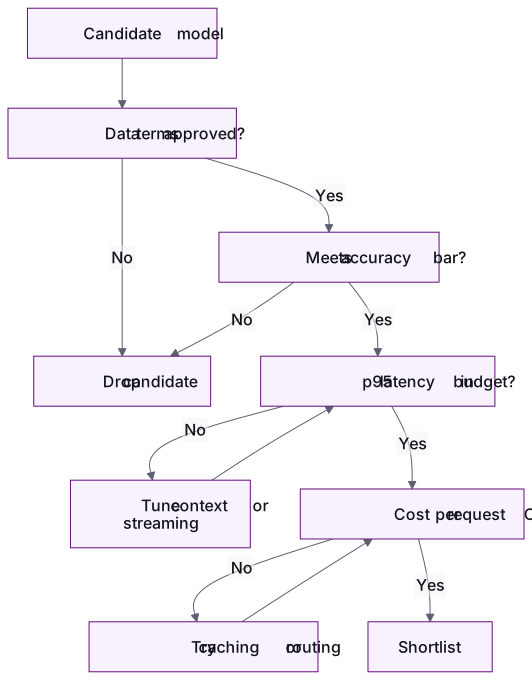
Set a minimum accuracy bar first. Then choose the fastest, cheapest model that clears it. Don't trade accuracy below that bar for savings.
| Criterion | What to measure | How to set the target |
|---|---|---|
| Accuracy | Evaluation score by category, grounding rate, correct refusals | Agree it with domain experts. Set a stricter bar for high-risk categories |
| Latency | Time to first token and total response time at p95, under realistic load | Base it on the user experience: an inline suggestion needs a much tighter budget than a background report |
| Cost per request | Input and output tokens × price, plus retrieval, retries and guardrail calls | Base it on what one request is worth to the business |
| Data handling | Training use, retention, processing region | Get legal and security sign-off (see the next section) |
Measure cost per request, not price per token. A cheaper model that needs a longer prompt or two retries can end up costing more. Caching also changes the numbers. In Anthropic's prompt caching, 5-minute cache writes cost 25% more than base input tokens, while cache reads cost a fraction of the base input price. So a long, stable system prompt can cost much less than its raw token count suggests. Check each provider's current pricing before you compare.
Each candidate passes through these checks in order:
What data privacy and hosting questions decide the shortlist?#
Ask these questions before you run any benchmarks. A model that breaks your data rules is out, however well it scores.
- Is our data used for training? Check the default setting and what the contract says.
- How long are prompts and outputs kept, and can that be shortened? OpenAI's data controls documentation, for example, shows for each endpoint whether data is used for training and how long abuse-monitoring logs are kept. Approved customers can choose Zero Data Retention or Modified Abuse Monitoring.
- Where is the data processed? Data residency rules can cut the list on their own.
- How will the model be hosted? The options are a provider's API, a managed service in your own cloud account, or an open-weight model you run yourself. Each one moves the trade-off between control, operating effort and model quality.
- Who can see what? Retrieval must apply each user's permissions at query time, so the model never sees documents that user can't open.
- What documentation does the provider give you? Under the EU AI Act, obligations for general-purpose AI model providers have applied since 2 August 2025. They include required documentation for downstream developers. Models placed on the market before that date have until 2 August 2027 to comply. Ask for this documentation during procurement.
If you're not sure which internal data a model should see at all, settle that first. An AI data-readiness review decides what models and agents may use, and why.
When should you route between multiple models instead of picking one?#
Route between models when your traffic mixes easy and hard requests, or when no single model meets a feature's accuracy, latency and cost budgets together.
Signs you need routing:
- Your evaluation results show a small model matches a large one on most categories but falls short on a few.
- Cost per request at forecast volume is over budget.
- One workflow mixes quick steps, like intent detection or classification, with steps that need heavier reasoning.
Common patterns:
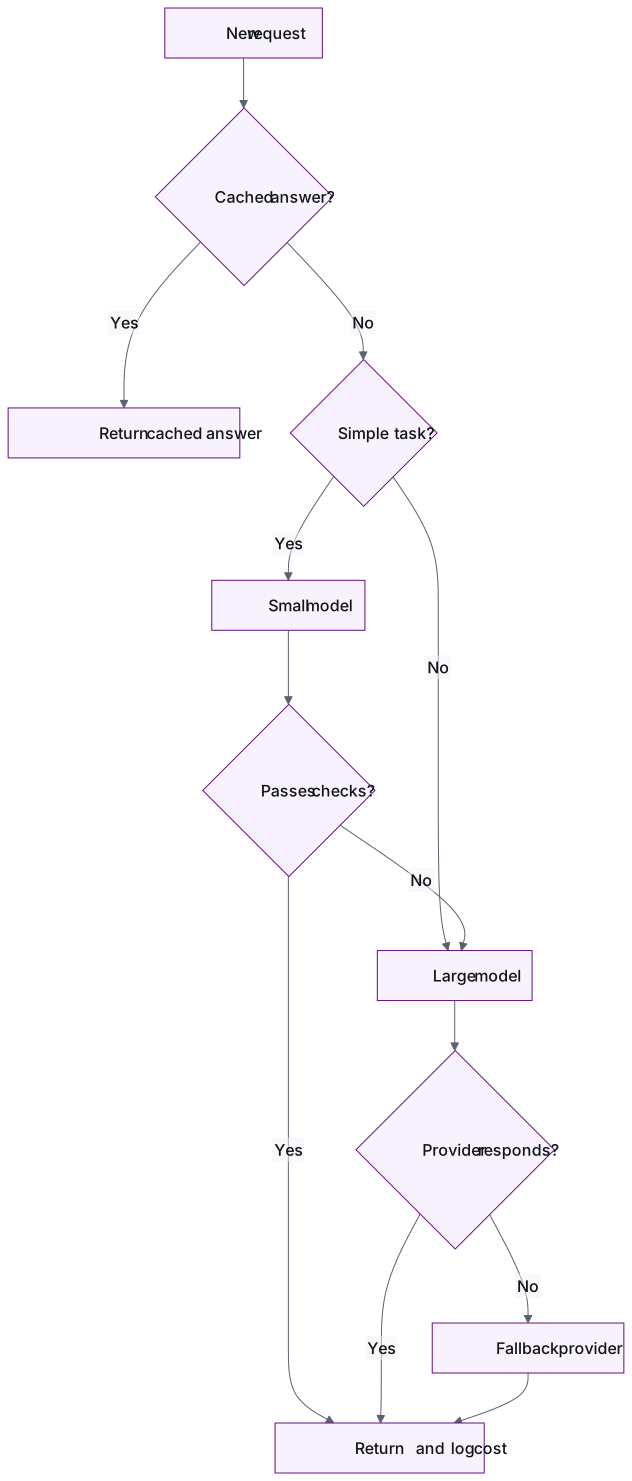
- Classify, then route. A cheap first step labels the request and sends it to the right model tier.
- Cascade. Try the cheaper model first. Escalate if it reports low confidence or fails a grounding check.
- Model per task. Use separate models for embeddings, extraction and generation.
Routing adds a component you have to test. Run the evaluation set for each route, and log which model answered every request. Without that log, you can't explain a bad answer or a spike in the bill. The cost side is covered in more depth in our guide to cutting cloud and LLM costs for SaaS.
How do you plan fallbacks when a provider slows down or fails?#
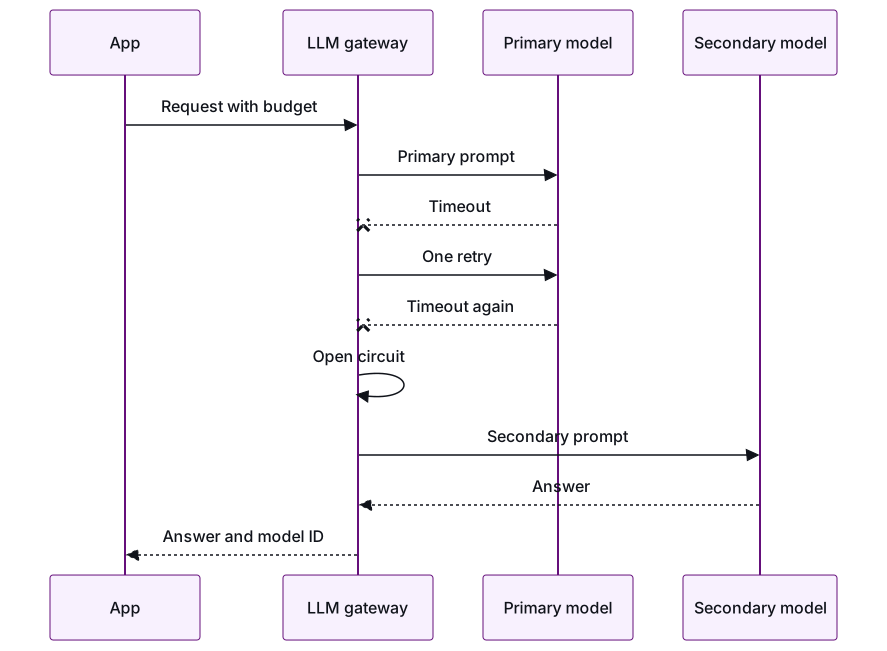
Put a gateway between your application and the providers. It enforces timeouts, retries once, and then switches to a secondary model you've already evaluated, or to a safe degraded response.
- Set timeouts from your latency budget, not from the provider's defaults.
- Qualify the secondary model the same way as the primary. Run the full evaluation set against it, and record any lower accuracy bar you accept for fallback traffic. Prompts rarely transfer between models unchanged, so keep a versioned prompt for each model.
- Use a circuit breaker. After repeated failures, stop sending traffic to the failing provider for a set period. Then send occasional test requests to see whether it has recovered.
- Define a degraded mode. For example: a cached answer, plain search results without generation, or a clear "try again" message.
- Only fall back to approved providers. An outage is no reason to send customer data somewhere legal hasn't signed off.
Here's what the gateway does when the primary model times out:
How do you re-evaluate safely when a new model is released?#
Treat a model change like a code release. Run the evaluation set offline, test the new model on live traffic in shadow mode, send it a small share of real users, and keep the old model one switch away.
- Offline: run the full evaluation set and compare results category by category, not just the overall score. A higher average can hide a drop in one high-risk category.
- Shadow: send copies of live requests to the new model without showing its answers to users. Compare quality, latency and cost per request.
- Canary: move a small share of traffic to the new model and watch user feedback, refusals and spend.
- Pin versions: use fixed model versions where the provider offers them, and re-run the evaluation set whenever a provider changes the model behind a name you call.
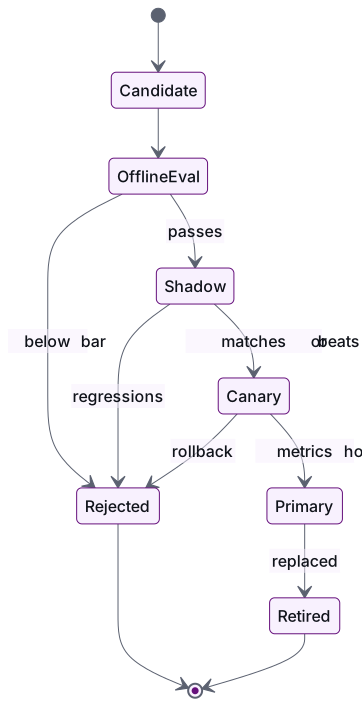
With the evaluation set in your pipeline, a new release takes hours to assess, not weeks. You can swap a model or prompt and see within minutes what got better or worse. Given how fast prices fall, it's also worth re-checking cost per request on a regular schedule, even when nothing seems broken.
Conclusion#
Start with an evaluation set, not a model. Rule out candidates on data terms first, then on accuracy. Among the ones left, choose on latency and cost per request. Add routing when your traffic mix calls for it, put a tested fallback behind every model, and re-evaluate each new release the way you'd test a code change.
If you're shipping an LLM feature and want help with the evaluation set, guardrails and cost targets, start with our AI strategy work or a paid pilot. Talk to an engineering lead →
Frequently asked questions
How large should an LLM evaluation set be?
Start small enough that your domain experts can review every expected answer, because a wrong answer key does more harm than a short one. Make sure it covers common questions, edge cases, questions the model should refuse, and questions that depend on user permissions. Add new items whenever production turns up a failure.
Can we use an LLM to grade the evaluation set?
Yes, an LLM judge is practical for open-ended answers, as long as you check it against human grades on a regular sample. Keep deterministic checks, like exact match, schema validation and correct citations, wherever an answer can be checked mechanically. Re-check the judge whenever you change its model or rubric.
Should we self-host an open-weight model or use a provider API?
It depends on your data rules, your volume and your team's ability to run inference infrastructure. Self-hosting gives you the most control over where data goes, but your team takes on scaling, patching and monitoring. Score both options against the same evaluation set, and compare total cost per request, not just licence or token price.
How often should we re-run model evaluations?
Run the evaluation set on every change to a prompt, model or retrieval step, and whenever a provider updates the model behind a name you call. Also re-check cost per request on a fixed schedule, because model prices have been falling quickly.
What should we log for each LLM request?
At minimum: the model and version that answered, the prompt version, token counts, latency, cost, and whether a fallback or guardrail was triggered. This lets you explain a bad answer, track cost per feature, and show auditors which model produced which output.
- LLM
- Enterprise AI
- AI evaluation
- Generative AI
- LLM routing
Newsletter
Get new articles by email
A short monthly round-up of what we've written on engineering pods, quality and AI. No spam.
