
Jenkins and Kubernetes don't compete, so one doesn't replace the other. Jenkins is a CI/CD automation server: it runs the jobs that build, test and deploy your code. Kubernetes is a container orchestrator: it schedules, scales and heals the containers your applications and build agents run in. Many teams use both in one pipeline.

The comparison keeps coming up because the two meet in the middle. Jenkins often deploys to Kubernetes, and Kubernetes often hosts Jenkins. The real questions for a platform lead are about how they fit together and when to change the setup.
What is Jenkins, and what does it actually do?#
Jenkins is a server that runs your build, test and deploy steps automatically, in a set order, every time code changes.
The project describes itself as a self-contained, open source automation server for automating tasks related to building, testing, and delivering or deploying software. Its main feature is Pipeline, where you define the stages of your delivery process as code. Jenkins is built in Java, and its GitHub repository lists over 2,000 plugins. That plugin ecosystem explains both why teams like Jenkins and why it can be hard to run.
In practice, a Jenkins setup does four things:
- Triggers a pipeline when someone pushes a commit, opens a pull request or a schedule fires.
- Runs stages in order, such as compile, unit test, package, scan and deploy, on worker machines called agents.
- Records results: logs, test reports, build artifacts and pass/fail status.
- Gates promotion: a failed stage stops the build from reaching the next environment.
Jenkins doesn't need Kubernetes. According to its docs, you can install it through native system packages, Docker, or standalone on any machine with a Java runtime.
Is Jenkins an orchestration tool?#
Yes, but it orchestrates workflows, not infrastructure. Jenkins decides which steps run, in what order and under what conditions. It doesn't keep services running.
Even the Jenkins documentation talks about tutorials that help developers orchestrate and automate building their project with Pipeline. That's workflow orchestration. When a pipeline finishes, Jenkins's job is done. If the deployed service crashes ten minutes later, Jenkins won't notice and won't restart it.
Container orchestration is a different job. Kubernetes looks after workloads continuously, long after any pipeline has ended.
What does Kubernetes do that Jenkins doesn't?#
Kubernetes keeps applications running in the state you declared. Jenkins only runs a sequence of steps and then stops.
You tell Kubernetes what should be running: which container images, how many copies, how much CPU and memory, and how they connect. It then works to keep reality matching that description:
- Scheduling: places containers on nodes that have the capacity for them.
- Self-healing: replaces containers and nodes that fail.
- Scaling: adds or removes replicas as load changes.
- Rollouts: replaces old versions with new ones step by step, and can roll back.
- Networking: gives services stable addresses and spreads traffic across replicas.
- Configuration: injects config and secrets without rebuilding images.
None of this is CI. Kubernetes doesn't watch your repository, compile code or run your test suite.
Jenkins vs Kubernetes: how do they compare side by side?#
They sit at different layers. Jenkins is the delivery engine and Kubernetes is the runtime platform.
| Jenkins | Kubernetes | |
|---|---|---|
| Category | CI/CD automation server | Container orchestrator |
| Core job | Build, test and deploy code | Run and keep containers running |
| Unit of work | A pipeline run (stages and steps) | Pods, deployments, services |
| Lifespan of work | Finite: a run starts and ends | Continuous: works toward desired state |
| Defined in | A pipeline file (Groovy-based) | Declarative YAML manifests |
| Triggered by | Commits, pull requests, schedules | Changes to declared state |
| Failure handling | Marks the build failed and stops | Restarts or reschedules workloads |
| Extends via | Plugins | Custom resources, operators |
| Can run on the other? | Yes, Jenkins can run on Kubernetes | Kubernetes doesn't run on Jenkins |
How do Jenkins and Kubernetes work together in one CI/CD pipeline?#
Jenkins builds and verifies the release, and Kubernetes runs it. The handoff point is a container image in a registry.
A typical flow:
- A developer pushes code. Jenkins picks up the change.
- Jenkins runs unit tests and static checks in a build agent.
- Jenkins builds a container image, scans it and pushes it to a registry.
- Jenkins updates the deployment definition, either by applying manifests directly or by committing a new image tag to a Git repository that a deployment controller watches.
- Kubernetes rolls out the new version and replaces pods gradually.
- Smoke tests run against the new version, and monitoring confirms it's healthy. If not, the release is rolled back.

This split keeps each tool on the job it does well. It also means you can replace either one later without rebuilding the whole chain. Our DevOps Engineering practice builds pipelines in this shape, with releases small enough to ship all day.
How do you run a Jenkins cluster on Kubernetes with dynamic agents?#
Run the Jenkins controller as one long-lived pod with persistent storage. Then let Jenkins start a fresh agent pod for each build and delete it when the build finishes.
This fixes the classic Jenkins pain point: a fleet of static build servers that sit idle at night, queue up at 4 p.m. and slowly drift apart in configuration. Here's how to set it up:
- Deploy the controller with persistent storage. The controller keeps job history and configuration in its home directory, so put it on a persistent volume. Treat the controller as a stateful service.
- Give the controller zero executors. Builds should never run on the controller itself, only on agents.
- Connect Jenkins to the cluster. Use the Kubernetes plugin with a service account limited to a dedicated build namespace. Don't grant cluster-wide admin.
- Define pod templates. Each template is an agent pod: the agent container plus the tool containers a build needs, such as a JDK, Node or a test browser. Every build gets a clean, identical environment.
- Set resource requests and limits. This lets the Kubernetes scheduler place build pods properly and stops one heavy build from starving the others.
- Manage configuration as code. Keep the controller configuration, plugin list and pod templates in version control so you can rebuild the controller from scratch.
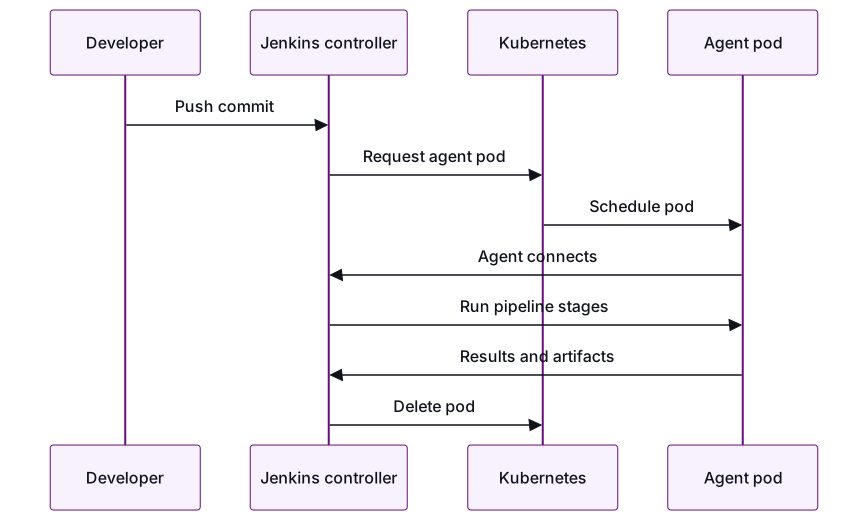
Things to watch:
- The controller is still a single point of failure. Back up its persistent volume and test that you can restore it.
- Cold starts. New pods start with empty caches, so use a shared dependency cache or pre-built tool images.
- Image builds. Don't run privileged Docker-in-Docker containers in a shared cluster. Use a builder that doesn't need privileged mode.
- Plugin sprawl. Every plugin is code you have to patch. Audit the list regularly.
- Separation from production. Run build workloads in their own cluster, or at least in their own isolated namespace with network policies.
When should you move from Jenkins to Kubernetes-native CI/CD?#
Move when keeping the Jenkins controller running costs more than its flexibility is worth, and almost everything you deploy already runs on Kubernetes.
Kubernetes-native CI/CD tools define pipelines as Kubernetes resources and run each step as a container in the cluster. Many pair this with a GitOps deployment model, where a controller inside the cluster pulls the desired state from Git instead of a CI server pushing changes in.
Signs it's time to move:
- Engineers spend real time each month on plugin upgrades, controller restarts or Groovy library fixes.
- Every deploy target is a Kubernetes cluster.
- You want each team to own its pipelines without asking a central Jenkins admin.
- Audit or compliance work needs a clear, Git-based record of what was deployed and when.
Reasons to stay on Jenkins:
- You deploy to VMs, mainframes, mobile app stores or on-premises hardware as well as Kubernetes.
- You have years of shared pipeline libraries that encode real release rules.
- The current setup is stable and isn't slowing delivery.
If you do move, avoid a big-bang switch. Migrate one low-risk service first and run both pipelines side by side for a few releases. Compare build times, failure rates and how much effort each takes, then decide. It's the same phased approach we use for cloud migrations: one workload first, with a rollback plan for every step.
How do you keep tests and security checks in the pipeline whichever you choose?#
Define your quality gates as rules that don't depend on which tool runs them, and make them required before code merges or deploys.
Pipeline engines change. The release bar shouldn't. At Calidad, every release passes three gates whether a person or an AI wrote the change:
- Tested. Unit and integration tests on every change, contract tests for APIs, and end-to-end tests on a short-lived environment for anything user-facing. Suites need to be fast enough to run every time and stable enough that a red build means something. That's the focus of our Test Automation practice.
- Secured. Static analysis, dependency scanning, secret detection, container image scanning and checks on Kubernetes manifests, all running as pipeline stages that can fail the build.
- Reviewed. A senior engineer approves the change before merge. With AI writing more code, this gate matters more, not less. Our guide to verifying AI-generated code before production covers how to enforce it.
To make sure the gates hold if you switch engines:
- Keep check configuration (test commands, scanner rules, severity thresholds) in the repository, not inside the CI tool's UI.
- Enforce gates through branch protection and deployment rules, so nobody can skip them by editing a pipeline.
- Save evidence for each release: test reports, scan results and approvals, linked to the image that shipped.
Conclusion#
Jenkins and Kubernetes answer different questions. Jenkins decides how code gets built, verified and released. Kubernetes decides how the released software keeps running. Running Jenkins on Kubernetes with dynamic agents removes most of the old pain of static build servers. Moving to Kubernetes-native CI/CD makes sense when your whole estate runs on Kubernetes and the Jenkins upkeep has become a cost. Whichever you choose, the tests, security checks and review gates should stay the same.
If you're weighing a pipeline redesign or a move off Jenkins, we can test it on one service in a paid pilot before you commit to more. Talk to an engineering lead →
Frequently asked questions
Can Kubernetes replace Jenkins?
Not by itself. Kubernetes runs and manages containers, but it doesn't watch repositories, run test suites or manage build pipelines. What can replace Jenkins is a Kubernetes-native CI/CD tool that runs on top of Kubernetes.
Do I need Kubernetes to run Jenkins?
No. Jenkins can be installed through native system packages, Docker, or standalone on any machine with a Java runtime. Running it on Kubernetes is mainly worth it when you want build agents that are created on demand and deleted afterwards, instead of static build servers.
What is a dynamic Jenkins agent?
It's a build worker that Jenkins creates as a Kubernetes pod when a build starts and deletes when the build ends. Every build gets a clean, identical environment, and you only use cluster capacity while builds are running.
Should Jenkins run in the same Kubernetes cluster as production?
We advise against it. Build pods run untrusted code from pull requests and often need broad permissions, so put them in a separate cluster or at least an isolated namespace with tight access controls and network policies.
Is it risky to migrate pipelines off Jenkins?
It's manageable if you do it in phases. Move one low-risk service first and run old and new pipelines side by side for a few releases. Keep the same test and security gates in both so you're comparing like with like.
What is the difference between Jenkins, Docker and Kubernetes?
Jenkins automates the build, test and deploy steps of a pipeline. Docker packages an application and its dependencies into an image. Kubernetes runs and scales those images as containers across servers. A common setup uses all three: Jenkins builds a Docker image, pushes it to a registry and deploys it to Kubernetes.
- Jenkins
- Kubernetes
- CI/CD
- DevOps
- Containers
Newsletter
Get new articles by email
A short monthly round-up of what we've written on engineering pods, quality and AI. No spam.
