
Modernizing a legacy .NET estate to cloud-native without downtime means moving it one piece at a time. You assess every component and choose rehost, replatform, refactor or re-architect for each. You put a routing facade in front of the monolith. Then you move traffic to modern .NET services only after tests, security checks and a rehearsed rollback show that each step is safe.
Most of the pressure is about delivery speed and cost, not a support cliff. According to Microsoft's .NET Framework support policy, .NET Framework 4.8.1 is the latest version and will keep shipping with future Windows releases. It stays supported as long as it runs on a supported version of Windows. The target version matters more. .NET 8 and .NET 9 reach end of support on November 10, 2026, and after that date Microsoft stops providing servicing updates, security fixes and technical support. New work should target .NET 10, a Long Term Support release supported from November 11, 2025 to November 14, 2028 (release notes).
What does a legacy .NET estate usually contain, and what blocks it from running cloud-native?#
A typical estate mixes WebForms and MVC apps, WCF services, Windows services and one shared SQL Server database. What blocks it is how tightly that code is tied to IIS, Windows and System.Web.
A typical inventory looks like this:
- Web front ends: ASP.NET WebForms and MVC apps hosted on IIS
- Service layer: WCF services, often over SOAP or net.tcp, called by internal apps and sometimes by partners
- Background work: Windows services, Task Scheduler jobs and SQL Agent jobs
- Data: one SQL Server database (sometimes several) with business logic in stored procedures and queries that reach across databases
- Plumbing: shared class libraries, COM components, Windows authentication, settings in
web.configor the registry, and files on network shares
Three things stop this code from running cloud-native:
- System.Web. ASP.NET apps rely on System.Web.dll for cookies, headers, session and request values, usually through types like HttpContext. Those types don't exist in ASP.NET Core, and refactoring them out of an existing codebase is hard (.NET Blog).
- State on the server. In-process session, local file writes and machine-specific config break when you run several identical instances behind a load balancer.
- Windows-only dependencies. COM, the registry, Windows authentication and the GAC all assume a Windows host that someone patches by hand.
Should each .NET component be rehosted, replatformed, refactored or re-architected?#
Decide for each component, not for the whole estate. Most estates end up using all four options.
| Option | What it means | Fits when | Watch for |
|---|---|---|---|
| Rehost | Move the VM or app to cloud infrastructure unchanged | The component is stable, rarely changes or is due to be retired | You keep the Windows patching and licensing work |
| Replatform | Small changes so it runs on managed services (e.g. managed SQL Server, Windows containers) | The code is fine but running it is expensive | Limited gain in delivery speed |
| Refactor | Port to modern .NET and keep the same architecture | The code changes often and its dependencies have modern equivalents | Hidden System.Web and serialization differences |
| Re-architect | Split into services, events or new data boundaries | The component is a bottleneck for scaling or release speed | Highest cost; save it for where it pays |
Score each component on these criteria:
- Change frequency: code that changes every sprint gains most from a modern stack.
- Business criticality: high-risk components go later, once the migration process is proven.
- Windows coupling: count the System.Web, WCF, COM and registry dependencies.
- Test coverage: with no tests, write characterization tests before you touch the code.
- Data coupling: shared tables and stored procedures limit how far one component can move on its own.
How do you move from .NET Framework to modern .NET without a big-bang rewrite?#
Put a facade in front of the legacy app and move features behind it one route at a time. This is the strangler fig pattern.
Microsoft's Azure Architecture Center describes the pattern this way: you migrate a legacy system gradually by replacing pieces of functionality with new services. Over time the new system takes on all the old system's features, and the old one can be switched off. For web apps, Microsoft's incremental migration guide recommends setting up an ASP.NET Core app that proxies to the original .NET Framework app. You create the new ASP.NET Core project next to the existing app and configure it to forward requests to the original using YARP (Yet Another Reverse Proxy).
A practical sequence:
- Prepare shared libraries. Convert projects to SDK-style. Where libraries depend on HttpContext, build them against Microsoft.AspNetCore.SystemWebAdapters, so libraries that use System.Web APIs can target .NET Framework, .NET Core or .NET Standard 2.0.
- Ship the facade with nothing migrated. Traffic enters the ASP.NET Core app, and any route it can't match is passed to the ASP.NET application through YARP. This first step proves the proxy itself causes no regressions.
- Move one low-risk route group, such as a read-only reporting page, and handle it in the new app.
- Grow route by route, ordering routes by business value and risk.
- Switch off the legacy app once monitoring shows no traffic reaching it.

Keep one database at first. If you split the code and the data in the same step, you double the number of things that can go wrong, and rollback gets much harder.
What do you do with WCF, WebForms and Windows-only dependencies?#
Treat each one by what its callers need. Keep contracts that external clients rely on, rebuild UI that can't be ported, and turn Windows services into workers that run in containers.
- WCF. Microsoft notes that CoreWCF is a good choice if an app has to stay compatible with existing clients that call WCF services. However, CoreWCF only supports a subset of WCF's features, so apps that move to it need code changes and testing (Microsoft Learn). For internal service-to-service calls that you control at both ends, gRPC or plain HTTP APIs are usually the cleaner target.
- WebForms. WebForms is built on System.Web, so there is no straight port. Rebuild screens one at a time behind the facade, using Razor Pages, Blazor or a separate front end. Start with the pages people use most and those that change most often.
- Windows services. Rewrite them as .NET worker services. They can then run as containers or scheduled jobs, with health checks and logs going to your central observability stack.
- COM, registry and Windows authentication. Put each one behind an interface so the rest of the code no longer depends on it directly. Move identity to a standards-based provider. Anything that truly can't leave Windows yet can run in a Windows container for now.
Can AI speed up .NET code conversion, and how do you verify what it writes?#
Yes. AI now does much of the mechanical conversion work, but every change it makes still has to pass tests, security checks and review by a senior engineer before it ships.
Microsoft's own tools show both sides. GitHub Copilot modernization can upgrade an application's .NET version, from an older .NET or from .NET Framework, and it validates code changes by checking that the code compiles and that CVEs are fixed (Microsoft Learn). The same documentation also says the upgrade suggestions aren't guaranteed to follow best practices (FAQ). Code that compiles can still behave differently.
A verification routine that works:
- Capture current behavior first. Before conversion, record requests and responses at the facade and turn them into characterization tests.
- Run the same suite on both paths. Legacy and converted code should return the same results for the same inputs.
- Look where conversions quietly drift: JSON serialization, date and culture handling, text encoding, async changes, and differences in Entity Framework query behavior.
- Run security and dependency checks on every change, since a conversion often brings in new packages.
- Keep release evidence: which tests ran, what was scanned, and who approved the change.
At Calidad, every release passes three gates: tests show it works, security checks show it's safe, and a senior engineer's review shows it's right. Whether a person or an AI wrote the change, it doesn't ship until it passes all three.
How do containers, Kubernetes and managed cloud services fit a modernized .NET app?#
Containers are the standard way to package modern .NET services. Kubernetes or a managed container platform runs them, and managed databases, queues and secret stores replace servers you used to patch yourself.
- Containers: Linux containers for code already on modern .NET. Windows containers are a temporary stop for components that haven't moved yet.
- Kubernetes: worth it when you run many services and have the skills to operate a platform. For a few services, a managed container service is simpler.
- Stateless services: move session data to a distributed cache, files to object storage, and config to environment variables or a secrets store.
- Data: replatform SQL Server to a managed service first, and redesign data ownership later, once the code boundaries are stable.
- Observability: add tracing and health checks from the first migrated route, so you can compare the new path with the legacy one.
How do you keep the system live and roll back safely at every step?#
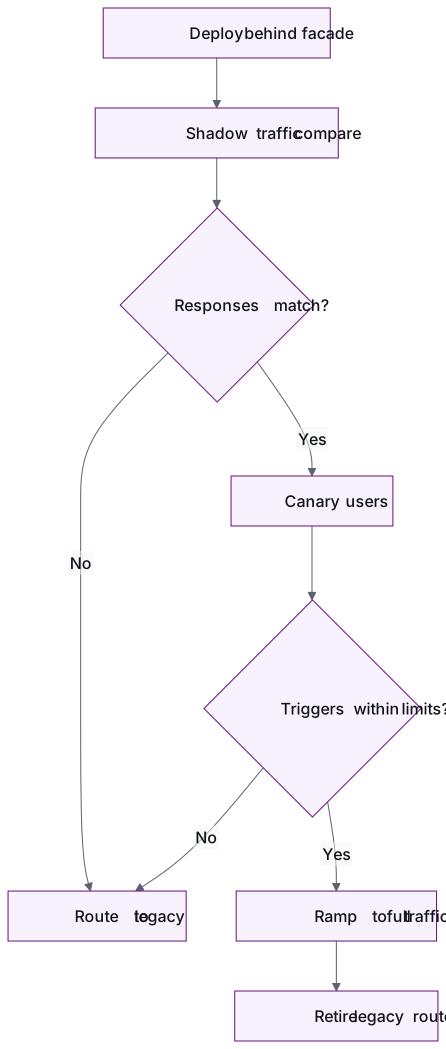
Roll back by switching traffic, not by redeploying. Every piece goes live behind the facade with a switch that can send users back to the legacy path straight away.
- Shadow: copy live traffic to the new path and compare responses without serving them to users.
- Canary: send a small share of real users to the new path.
- Ramp up: increase that share step by step, checking the rollback triggers you agreed in advance (error rate, latency, data mismatches).
- Keep the legacy path ready until the exit criteria hold for an agreed period.
- Make data changes backward-compatible: add new schema first and remove old schema only after the rollback window has closed.
This is how our Cloud Migrations practice works: we move in phases with a rollback plan for every step. A low-risk workload goes first so the runbook is proven before anything critical moves. Tests, security checks and data-integrity checks run on every release, before and after cutover. Our Platform Modernization service applies the same approach to move critical legacy systems onto cloud-native platforms while the business keeps running.
How should you scope a pilot before committing to the full modernization?#
Pick one bounded piece that involves the genuinely hard parts: the facade, one migrated route group or service, its data access and its pipeline. Agree success criteria before any work starts.
Good exit criteria for a .NET modernization pilot:
- The piece runs in production on .NET 10 behind the facade
- Characterization tests pass on both paths, and a rollback has been rehearsed, not just written down
- A pipeline enforces tests, security checks and review on every change
- Error rate and latency are measured against the legacy baseline
- The estimate for the rest of the estate is based on the effort the pilot actually took
Our engagements begin with a paid pilot: one pod, one outcome, success criteria agreed up front, and no long-term contract. After the pilot you decide whether to scale, adjust or stop, based on working software.
Conclusion#
Moving a legacy .NET estate to cloud-native without downtime comes down to sequencing. Assess each component and give it its own path. Put a facade in front, move routes one at a time, and replace WCF, WebForms and Windows services based on what their callers need. Use AI to speed up conversion, but put every change it makes through the same gates. Make sure every step can be rolled back by switching traffic, and start with a pilot that proves the approach on real code.
Frequently asked questions
Should we target .NET 8 or .NET 10 when we migrate?
Target .NET 10. .NET 8 reaches end of support on November 10, 2026, but .NET 10 is an LTS release supported until November 2028. Moving straight to .NET 10 saves you a second upgrade soon after the first.
Do we have to migrate off .NET Framework 4.8.1 because support is ending?
No. .NET Framework 4.8.1 stays supported as long as it runs on a supported version of Windows. The usual reasons to move are delivery speed, hosting cost, container and cloud support, and hiring, not a deadline.
Can we keep our SQL Server database during the migration?
Yes, and at the start you usually should. Old and new code share one database while routes move behind the facade. Redesign data ownership only after the code boundaries are stable, so you never split code and data in the same step.
Is CoreWCF a long-term answer for our WCF services?
CoreWCF suits services whose existing clients you can't change, such as partner integrations. It supports only part of WCF's features, so plan for code changes and testing. For internal calls you control at both ends, gRPC or HTTP APIs are usually better long-term targets.
How long does a .NET modernization pilot take?
It depends on the piece you choose, which is why you should agree scope and success criteria up front instead of fixing a duration first. A good pilot ends with one piece live on modern .NET behind the facade, a rehearsed rollback, and an evidence-based estimate for the rest of the estate.
What do .NET modernization services include?
An assessment of every component of the application, a plan per component (rehost, replatform, refactor or re-architect), a routing facade so traffic can move gradually, migration to modern .NET route by route, and tests, security checks and a rehearsed rollback before each cutover.
- .NET modernization
- cloud migration
- strangler fig
- ASP.NET Core
- legacy systems
Newsletter
Get new articles by email
A short monthly round-up of what we've written on engineering pods, quality and AI. No spam.
