
A production-ready AI agent can act on real systems without putting them at risk. Four controls make that possible. Each agent gets permissions limited to its task. A person approves any action that is high-impact or can't be undone. An audit trail records every decision and tool call. And an evaluation suite runs before every release. Without these, you have a demo, not a product.
Missing controls are one of the main reasons agent projects fail. Gartner predicts over 40% of agentic AI projects will be canceled by the end of 2027. It names rising costs, unclear business value and inadequate risk controls as the causes. The sections below cover the controls that deal with the third cause, and help with the other two.
What makes an AI agent production-ready rather than a demo?#
A demo shows that an agent can finish a task once. A production agent finishes it safely on every input, including hostile ones, and leaves a record of what it did.
Before an agent touches live systems, check that it is:
- Bounded: it can reach only the tools and data its job needs.
- Supervised: risky actions wait for a named person to approve them.
- Observable: every step is logged and linked to a single run ID.
- Tested: an evaluation set runs on every change to the prompt, model, tools or retrieval.
- Recoverable: it has fallbacks, step limits and a way to switch off writes without a redeploy.
- Budgeted: cost and latency per run are tracked against a target.
If any one of these is missing, the agent depends on the model behaving well. That isn't a control.
How should you scope an agent's permissions across your systems?#
Give each agent its own identity with the fewest tools and permissions the task needs. Enforce those limits in the systems it calls, not in the prompt.
The OWASP Top 10 for LLM Applications 2025 lists "Excessive Agency" as LLM06. It traces the risk to three causes: too much functionality, too many permissions and too much autonomy. OWASP also notes that prompt injection can come from a user, a compromised extension or, in multi-agent systems, a compromised peer agent. You can't train that risk away, so you narrow what an agent is able to do.
Steps that work in practice:
- List the actions the workflow needs, then expose only those as tools. Give it
get_order_status(order_id), not a general "run SQL" or "call any API" tool. - Split read tools from write tools. Reads can be broad. Each write gets its own tool with its own checks.
- Give the agent its own service identity with short-lived credentials. Never share an admin key. When the agent acts for a user, use that user's permissions, so it can't see records the user couldn't.
- Put hard limits in the API layer. Cap refund amounts, the number of records per call and the call rate. The downstream service rejects anything out of bounds, whatever the agent "intended".
- Decide which data the agent may see. Classification and access policy belong in data governance, not in a prompt instruction.
Our AI Agents & Automation practice builds agentic workflows on this basis: scoped permissions, a full audit trail and a person on every risky action.
Which actions need a human approval step, and how do you design it?#
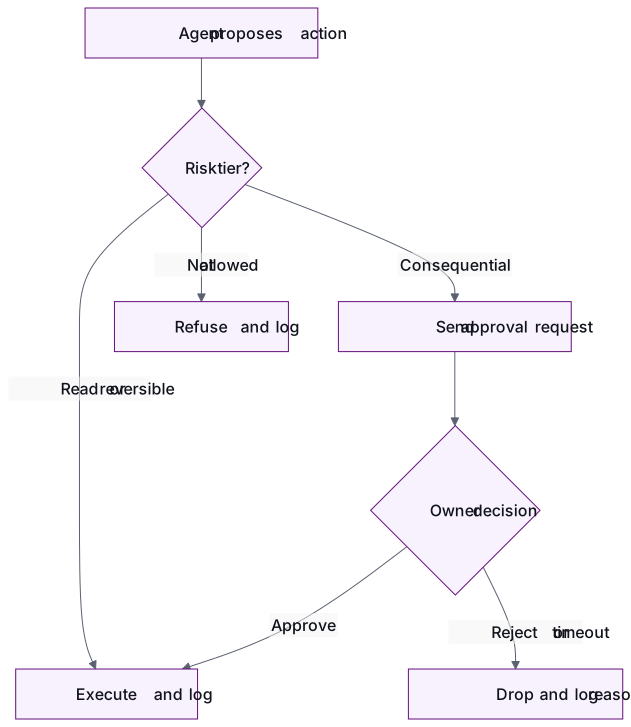
Require approval for actions that can't be undone, that move money, that change customer data in bulk, that go to people outside the company or that alter production. Let the agent act alone on reads and on steps that are easy to reverse.
Assign every tool a risk tier before launch:
| Tier | Example actions | Control |
|---|---|---|
| Read | Fetch a ticket, check order status, search documents | Agent acts alone, logged |
| Reversible write | Draft a reply, tag a record, open an internal ticket | Agent acts alone, logged, sample reviewed |
| Consequential write | Issue a refund, update a customer record, send an external email | A person approves before it runs |
| Irreversible or wide impact | Delete data, change production config, bulk updates, payments above a threshold | A named role approves, or the agent isn't allowed to do it |
A good approval step does more than ask "OK?":
- Show the reviewer what will change. That means the proposed action, its exact arguments, the sources the agent used and a short reason.
- Offer approve, edit or reject, and record the reason for each decision.
- Send it to the person who owns the system, not to a shared queue nobody watches.
- Let requests expire. If nobody responds in time, the action is dropped. The agent never goes ahead by default.
- Watch for rubber-stamping. If 99% of requests are approved within seconds, either the tier is wrong or the review is for show.
In some sectors approval is also a legal requirement. Article 14 of the EU AI Act says high-risk AI systems must be designed so that natural persons can effectively oversee them while in use. That page lists the obligation as applying from 2 December 2027 for Annex III high-risk systems. Check the current timetable with your counsel.
What should an agent's audit trail record?#
The audit trail should let you rebuild any run from start to finish. It records who started it, what the agent saw and decided, which tools it called with which arguments, what came back, who approved what, and which versions were live.
For each run, record:
- Run ID, trigger (user, schedule or event) and the identity the agent acted as
- Model, prompt version, tool versions and retrieval index version
- Inputs and retrieved context, with personal data redacted where policy requires it
- Each tool call: name, arguments, response, how long it took, and whether it succeeded or failed
- Every approval request: reviewer, decision, edits, reason and timestamps
- Final outcome, total cost and any fallback or handoff that fired
Store these records as structured, append-only events linked by run ID, not as free-text logs. Use them for four jobs: investigating incidents, finding the cause of a regression, adding new cases to your evaluation set and giving auditors evidence. For high-risk systems, Article 12 of the EU AI Act requires that they technically allow for the automatic recording of events (logs) over the lifetime of the system.
How do you test and evaluate agent behaviour before release?#
Build an evaluation set from real tasks before you choose a model or write a prompt. Run it on every change to the prompt, model, tools or retrieval, and block the release if scores drop.
A useful agent evaluation set includes:
- Golden tasks: real requests with the expected tool calls, arguments and final system state.
- Edge cases: missing fields, unclear requests and records that contradict each other.
- Adversarial cases: instructions hidden in tickets, emails or retrieved documents, and requests outside the agent's job.
- Approval checks: proof that the agent actually stops and asks before tier-three actions.
Score each run on task success, accuracy of tool calls and arguments, policy violations (the target is zero), and cost and latency. Run the suite against sandboxed or staging tools first. Then run the agent in shadow mode, where it proposes actions and people carry them out, until its proposals match what people would do.
That is the approach in our Generative AI Apps practice. We write the evaluation set from real user questions before we choose a model, and run scored test questions on every prompt, model or retrieval change. The code around the agent, such as tool wrappers, permission checks and approval logic, goes through the same three gates as any other release: tests, security checks and senior engineer review. Nothing ships without all three, whether a person or an AI wrote it. Our Quality Engineering service builds these gates.
For a wider list of risks to map, NIST's Generative AI Profile (NIST AI 600-1), published in July 2024, sets out risks specific to generative AI and suggests actions for managing them.
How do you orchestrate agents, models and fallbacks when something fails?#
Assume every model call and every tool call can fail. Decide in advance what happens when one does: retry, switch models, hand off to a person or stop safely.
Practices that keep failures small:
- Use a fixed workflow with agent steps when the path is known. Keep open-ended agent loops for the tasks that really need them.
- Set limits per run: maximum tool calls, tokens and wall-clock time.
- Make writes idempotent. A retried refund must not pay out twice.
- Route between models. Use the right model for each task, and fall back to another provider when one slows down or fails.
- Hand off to a person with full context when confidence is low or every fallback has failed.
- Keep a switch that turns off all writes without a redeploy.
- In multi-agent systems, treat another agent's output as untrusted input. Each agent keeps its own permissions.

Where should a first production agent start?#
Start with one internal workflow that runs often. Pick one where the agent mostly reads and proposes, any writes can be reversed, and you have a baseline number to beat.
Good first candidates:
- Happen often enough that time saved shows up within weeks
- Have a measured baseline, such as handling time, backlog or error rate
- Use data that is easy to reach and cleared for AI use
- Do limited damage if something goes wrong: internal users, reversible steps
- Have a business owner who will review its proposals
Ticket triage, enriching internal records and preparing reconciliations for a finance reviewer often fit. Roll it out in three stages: shadow mode first, then approval on every write, then autonomy for low-tier writes once the audit trail shows it can be trusted.
Our AI Strategy work scores candidate use cases on value, frequency, data access and risk against a measured baseline. Engagements then start with a paid pilot: one pod, one outcome, success criteria agreed up front. What a paid software vendor pilot needs covers how to scope one.
Conclusion#
An agent is ready for production when its limits live in your systems, not in its prompt. In practice:
- Each agent has its own identity and only the tools it needs.
- Risky actions wait for a named owner.
- Every run leaves an audit trail you can rebuild.
- Every change passes an evaluation set and the release gates before it ships.
Start with one bounded workflow, prove it on numbers you already track, and widen its autonomy only as the evidence builds.
Planning a first production agent? Talk to an engineering lead →
Frequently asked questions
Are guardrails written into the system prompt enough to keep an agent safe?
No. Instructions in a prompt guide behaviour, but prompt injection in a user message, document or email can override them. Real controls sit outside the model: scoped credentials, limits enforced by the API, approval steps and logging. Use prompt guardrails as an extra layer, never as the only one.
How is an AI agent different from traditional workflow automation or RPA?
Traditional automation follows steps a person defined in advance. An agent decides which steps to take and which tools to call based on what it reads. That flexibility is why agents need tighter permissions, approval steps and evaluation. If your workflow's path is fixed, plain automation with a single model step may be simpler and safer.
Does every agent action need a human to approve it?
No. Approving everything slows the workflow and teaches reviewers to rubber-stamp. Tier actions by risk: reads and easily reversed writes run alone and are logged, consequential writes need approval, and actions that can't be undone are approved by a named role or blocked. Review the tiers as the audit trail shows how the agent behaves.
How long should we keep agent audit logs?
It depends on your sector, the regulations that apply and your own data retention policy, so agree on it with legal and security before launch. Keep enough history to investigate incidents and rebuild regressions, and redact personal data in line with policy. For systems that may count as high-risk under the EU AI Act, check the record-keeping obligations with counsel.
Can we switch an agent to a different model later?
Yes, if you have an evaluation set. Run the same scored tasks against the new model and compare task success, tool-call accuracy, policy violations, cost and latency before you switch. Without an evaluation set, every model change is a guess that ships straight to production.
- AI agents
- AI governance
- guardrails
- human-in-the-loop
- audit trails
- LLM evaluation
Newsletter
Get new articles by email
A short monthly round-up of what we've written on engineering pods, quality and AI. No spam.
