
Treat every database schema change as a versioned, unchangeable migration file in source control. Break any change that would stop old code from working into expand-and-contract steps, so the old and new versions of the application both run during a deploy. Gate each migration with automated checks in CI. If something fails, roll the application back and fix the database with a new migration rather than editing history.
Why do schema changes break releases?#
Schema changes break releases because, during a deploy, two versions of your application share one database, and a change the new version needs can break the old one.
In a rolling or blue-green deploy, old instances keep serving traffic while new ones start. If the migration renames or drops a column, the old instances fail at once. Most outages from schema changes come from four causes:
- Incompatible changes. Renames, drops, type changes and new
NOT NULLconstraints that the running code doesn't expect. - Locks. In PostgreSQL, most
ALTER TABLEforms need anACCESS EXCLUSIVElock. A migration waiting for that lock blocks every later query on the table because of PostgreSQL's fair lock queue. Even a plain index build locks out writes (but not reads) until it's done. - Data volume. A migration that takes two seconds on a test database can take an hour on a production table.
- One-way changes. You can redeploy code in minutes. You can't undeploy a dropped column.
How do you version database migrations in source control?#
Store every schema change as a numbered migration file next to the application code. A migration tool applies the files in order and records which ones have run.
Flyway is a good example of the model. Its versioned migrations are applied to a target database in order exactly once. A schema history table stores a checksum of each file so the tool can tell if one has been edited. Flyway's documentation also advises against changing a migration once it has been applied to a permanent environment. If you need a correction, write a new script and roll forward.
Rules that hold up in practice:
- One logical change per file. Small files are easier to review, time and retry.
- Never edit an applied migration. Let the checksum check fail the build if someone does.
- Use versions that don't collide. Flyway Desktop uses a timestamp in the version by default, which helps avoid conflicts when two engineers add migrations at the same time.
- Only the pipeline applies migrations. Nobody runs SQL by hand against staging or production.
- Run the same files everywhere. Development, CI, staging and production should all reach the same schema by the same path.
What is expand-and-contract, and when do you use it?#
Expand-and-contract is a way to make a breaking change in three phases (expand, migrate, contract) so that every deploy works with both the current and the previous version of the application.
The pattern is also called parallel change. It is described as a way to make backward-incompatible changes to an interface in a safe manner. Here is how it works for renaming customer_name to full_name:
| Phase | Schema change | Application change | Can you safely roll back the app? |
|---|---|---|---|
| Expand | Add full_name as a nullable column |
New version writes to both columns | Yes |
| Migrate | Backfill full_name in batches |
Reads switch to full_name |
Yes |
| Contract | Add constraints, drop customer_name |
Remove the old code path | Only once no running version reads the old column |
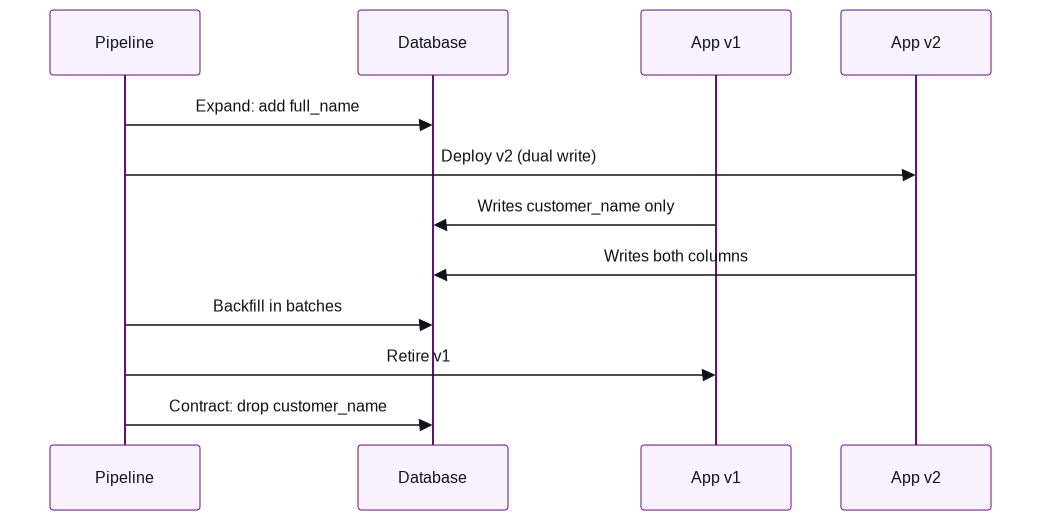
Use expand-and-contract for renames, type changes, splitting or merging tables, new NOT NULL constraints and any drop. You don't need it for purely additive changes, such as a new table or a nullable column that nothing reads yet.
Which checks should a migration pass in CI before it deploys?#
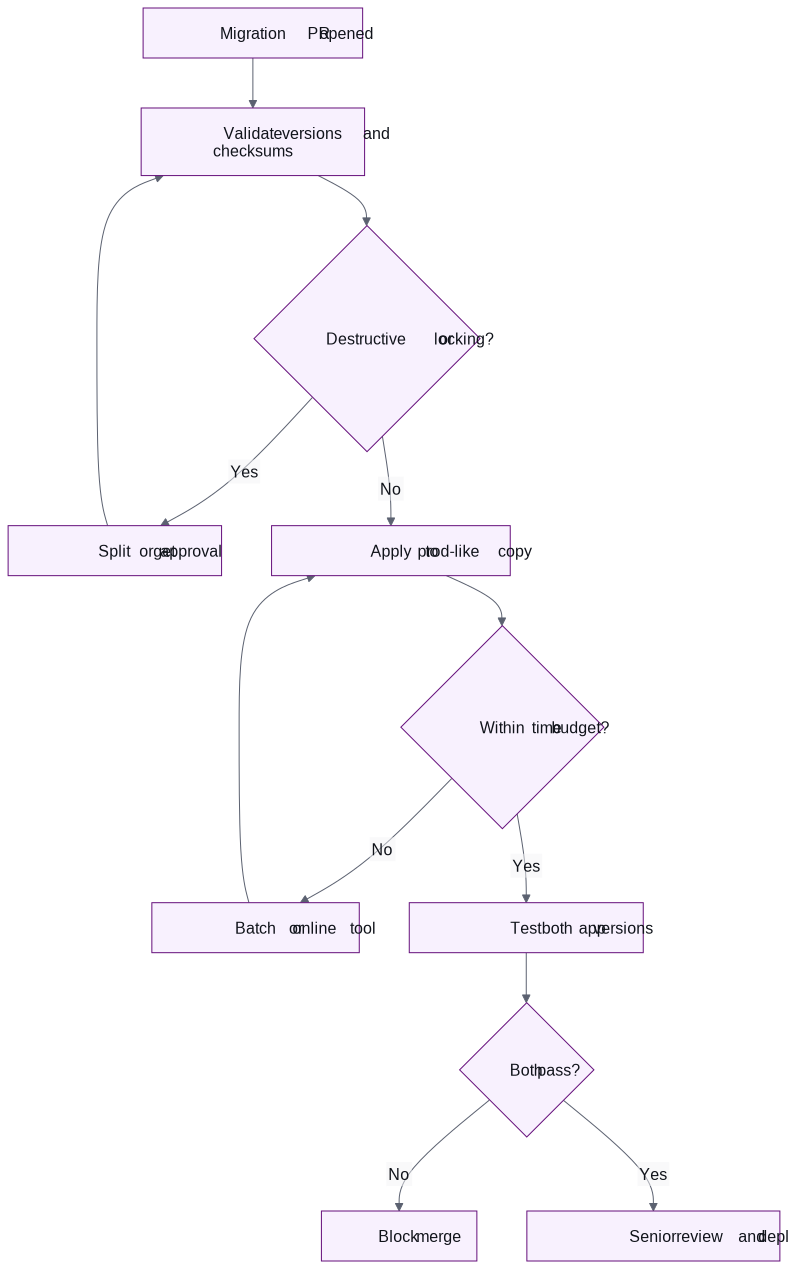
A migration should pass five checks before production: version and checksum validation, a lint for destructive or locking statements, a timed run against a production-like database, tests of both app versions against the new schema, and a review.
- Validate. Versions are unique and in order, and the checksums of applied files haven't changed.
- Lint. Flag
DROP,RENAME,ALTER ... TYPE,NOT NULLwithout a default, and index builds that block writes. - Apply and time it. Run the migration on a copy with production-scale data (anonymised where needed) and fail the build if it goes over a time budget.
- Check compatibility. Run the current release's tests and the previous release's tests against the migrated schema. If the previous release fails, the change isn't backward compatible.
- Approve. Contract steps that destroy data need a named approver, and they can only ship after the old code is retired.
These are the same policy-as-code checks we use for infrastructure as code security in CI/CD, applied to the database.
How do you review migrations written by AI tools?#
Review AI-written migrations through the same gates as any other migration. Reviewers should pay extra attention to the things a code assistant can't see from the diff alone: table size, lock behaviour and which application versions are still running.
An AI tool will produce valid SQL for "rename this column." It doesn't know the table has 400 million rows or that last week's release still reads the old name. Ask these questions of every generated migration:
- Does it combine expand and contract in one file?
- Does it backfill with a single unbounded
UPDATE? - Does it build an index without
CONCURRENTLY, or inside a transaction where that isn't allowed? - Does it edit an existing migration instead of adding a new one?
- Does the matching application change still work with the previous schema?
At Calidad, nothing ships without three gates: tests, security checks and a senior engineer's review. That applies whether a person or an AI wrote the change. Our guide to verifying AI-generated code before production explains how to set those gates up.
How do you roll back a schema change safely?#
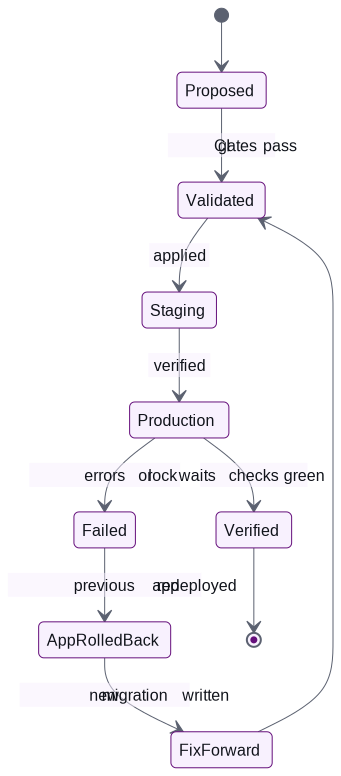
Roll back the application and roll the database forward: redeploy the previous app version, then fix the schema with a new migration rather than undoing the old one.
Expand-and-contract is what makes this work. After an expand step, the previous app version still runs against the new schema, so rolling back the app is quick and leaves no data at risk. That matches the Flyway guidance to create a new versioned migration script and roll forward.
If you keep "down" migrations, test them in CI like any other script. Never let a down migration run automatically if it drops data. Keep a restore point taken just before any contract step, and treat a full restore as a last resort, not the rollback plan.
How do you handle long-running migrations on large tables?#
Keep schema-change statements short, with lock timeouts and retries. Build indexes online, and move data in small batches outside the deploy step.
- Cap lock waits. PostgreSQL has had
lock_timeoutsince version 9.3. Postgres.ai describes setting it to around 50 ms and retrying, so a blocked migration gives up quickly instead of piling up traffic behind it. - Build indexes online. With
CREATE INDEX CONCURRENTLY, PostgreSQL builds the index without blocking inserts, updates or deletes. It cannot run inside a transaction block, so check how your migration tool wraps each file. - Backfill in batches. Update a bounded number of rows at a time, commit each batch, pause between batches and record progress so the job can resume. Run it as a separate job, not inside the deploy.
- Use an online schema tool on MySQL. gh-ost is GitHub's triggerless online schema migration tool. It can pause a migration and can run test migrations on a replica.
- Separate the steps. One release holds the fast schema change, a background job moves the data, and a later release holds the contract step.
How do you measure migration failures over time?#
Tag every deploy that includes a migration, then track its change failure rate and recovery time separately from deploys that only change code.
DORA defines change failure rate as how often deployments fail in production, and failed deployment recovery time as how long it takes to restore service after a failed deployment. In the benchmark bands IBM publishes, the top band is a change failure rate of 0–15% and recovery in under an hour. Track alongside those:
- Migration-related failures as a share of all migration deploys
- Migration run time in production compared with your CI time budget
- Lock-timeout retries per migration
- Open contract steps: columns and tables kept for compatibility that nobody has removed yet
- App rollbacks caused by schema changes
If AI tools are increasing how often you deploy, read these numbers together. We explain why in DORA metrics when AI writes your code.
Conclusion#
Schema changes stop breaking releases when they follow the same discipline as code. That means versioned files, small additive steps, CI gates that time the change and test both app versions, and a plan to roll the database forward. Our DevOps engineering pods build these pipelines with tests, security checks and review on every release. Each engagement starts with a paid pilot on one real outcome.
Talk to an engineering lead → https://calidadinfotech.com/contact-us
Frequently asked questions
Should database migrations run in the same pipeline as application deploys?
Yes, but as their own stage that runs before the matching application deploy, with its own gates and logs. Expand migrations ship before the code that needs them, and contract migrations ship only after the old code is retired. Large backfills should run as separate jobs, not inside the deploy stage.
Are down migrations worth writing?
They can help in development and for undoing simple additive changes, but they shouldn't be your production rollback plan. A down migration that drops a column also deletes the data written since the deploy. In production, redeploy the previous app version and fix the schema with a new forward migration.
How long should the expand and contract phases be apart?
Wait until no running version of the application, worker or report still reads the old structure. For most teams that means at least one full release cycle after the switch, confirmed by query logs or monitoring. Track open contract steps so they don't build up as technical debt.
Do feature flags replace expand-and-contract?
No, they work together. A feature flag can control when the application switches reads from the old column to the new one. The schema still has to support both versions while the flag is being rolled out.
What should a migration time budget be?
Set it from how long your traffic can tolerate a lock, not from how long the whole migration takes. Keep schema-change statements to a lock wait of milliseconds with retries. Move any data work that takes minutes or hours into batched background jobs.
- database migrations
- CI/CD
- DevOps
- expand and contract
- PostgreSQL
- release engineering
Newsletter
Get new articles by email
A short monthly round-up of what we've written on engineering pods, quality and AI. No spam.
