
An enterprise AI readiness assessment checks whether one specific AI use case can be built safely before you fund it: where its data lives, who owns it, how clean and current it is, whether you are allowed to use it for AI, which tools staff already use, and who signs off. Score each use case, not the whole company.
This matters because data, not the model, is where most AI projects stall. Gartner predicts that through 2026, organizations will abandon 60% of AI projects that lack AI-ready data. The same research found that 63% of organizations either lack the right data management practices for AI or aren't sure whether they have them. A readiness assessment shows you that gap before the budget is spent.
What does an enterprise AI readiness assessment cover?#
It covers six checks, run against each use case you might fund: data location, ownership, permission to use, quality and freshness, tools already in use, and sign-off.
Assessing "the company" as a whole gives you a vague maturity score that nobody can act on. Assessing one use case gives you a specific list of things to fix.
| Check | The question | Evidence you should have |
|---|---|---|
| Location | Which systems hold the data this use case needs? | A source map with access paths |
| Ownership | Who answers for each dataset? | A named business owner and technical owner |
| Permission | May we use it for this AI purpose? | Consent, contract and classification review |
| Quality | Is it accurate, complete and fresh enough? | Sample checks and an evaluation set |
| Tools | What AI tools are staff already using? | A tool inventory and approved list |
| Sign-off | Who decides what AI may touch? | A written policy with named approvers |
If you need a reference framework, the NIST AI Risk Management Framework groups this work into four functions: govern, map, measure and manage. ISO/IEC 42001 is the international standard for AI management systems, and data quality is one of the things it covers. Neither one replaces a check against a specific use case, but both help you organize the evidence.
Where does the data a use case needs actually live?#
Usually it lives in more places than the person proposing the use case expects, so trace every input back to its system of record before anyone picks a model.
Work through it in four steps:
- List the inputs. Write down what the AI needs in order to answer or act: customer history, contract terms, product specs, ticket notes.
- Find the system of record for each one. Separate it from the copies. One customer often exists in CRM, billing, support and a spreadsheet, each with a slightly different address.
- Record how you'd reach it. Note whether there's an API, an export, a database read or nothing at all. "It's in someone's inbox" is a finding too.
- Note how fresh it must be. A support assistant may need data from the last few minutes. A quarterly finance summary can wait for an overnight batch.
Any input with no reachable source is a blocker. Find it now, not in week six of a build.
Who owns the data, and who may use it for AI?#
Every dataset the use case touches needs a named business owner and a named technical owner. Using that data for AI needs explicit permission, not an assumption.
Ownership comes first because data with no owner never gets fixed. Our Data Governance & MDM practice starts by writing down a business owner and a technical owner for every critical entity and dataset. Then come classification, lineage and access policy, which decide what data models and agents may see.
For permission, check three things:
- Purpose. Was the data collected under terms that cover this use? Customer data gathered to process orders isn't automatically cleared for training or retrieval. Ask your privacy team.
- Contracts. Vendor and partner agreements may limit how their data can be processed or which third parties can receive it.
- Access at query time. If an assistant retrieves documents, it must respect the permissions of the person asking. Otherwise a staff member can get answers drawn from files they were never allowed to open.
How clean and current does the data need to be?#
It needs to be clean enough to pass an evaluation set built for that use case, and as fresh as the decision it supports. There's no universal threshold.
Gartner's own guidance is blunt: if the data has issues, then the data is not ready for AI. In practice, test these criteria on a sample of real records:
- Duplicates. How many entities appear more than once with conflicting values?
- Completeness. What share of the records has the fields the use case depends on?
- Freshness. How old is the newest record compared with what the decision needs?
- Definitions. Does "active customer" or "revenue" mean the same thing in every source?
- Ground truth. Do you have enough correct, labeled examples to score the AI's answers?
The last one is the one teams skip most often. Without a set of real questions and correct answers, you can't tell whether a model, prompt or data fix made things better or worse.
Which AI tools and data are your teams already using without policy?#
Probably more than you know. Take an inventory before you write a policy, because the policy has to fit how people already work.
Unapproved use is common. Microsoft and LinkedIn's 2024 Work Trend Index found that 78% of AI users bring their own AI tools to work. A 2025 WalkMe survey of 1,000 US workers found that 78% admit using AI tools their employer had not approved, and 51% had received conflicting guidance.
To build the inventory:
- Run a short anonymous survey that asks which tools people use, for which tasks, and with what kind of data.
- Cross-check against SSO logs, expense claims and browser-extension lists.
- Sort each tool into one of three groups: approve as is, replace with a sanctioned option, or block.
- Publish the approved list alongside clear data rules. Staff need to know what they can use, not just what's banned.
Who signs off on what AI is allowed to touch?#
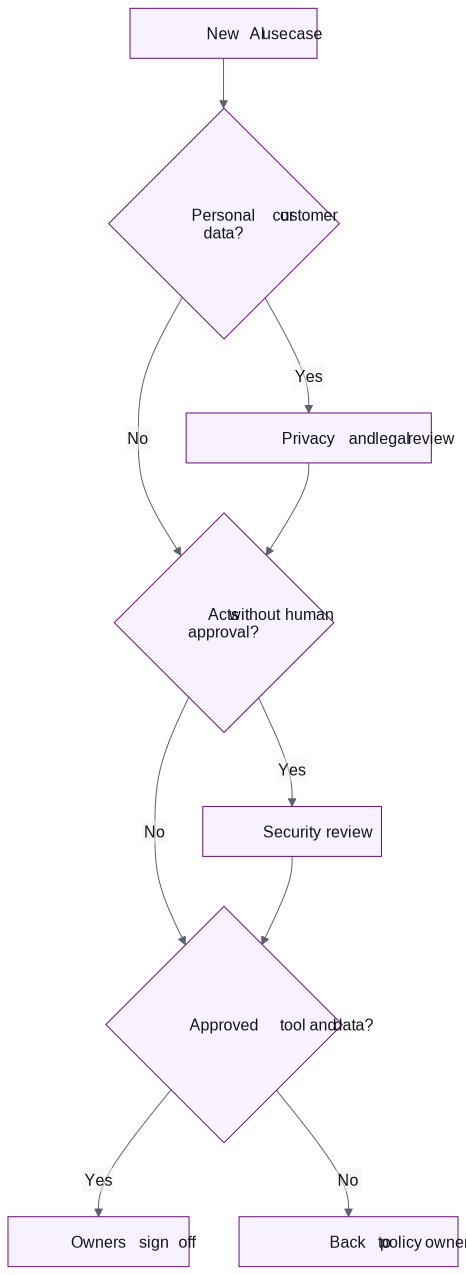
A small named group signs off: the business owner, the data owner, security, and legal or privacy. They work from a tiered rule, so low-risk cases move fast and risky ones get a closer look.
The routing below is a pattern we recommend. Tune the questions to your own risk appetite.
If you operate in Europe, regulatory dates should shape this policy too. Under the EU AI Act, transparency obligations have applied since August 2026, and most high-risk deadlines now fall in December 2027 or August 2028. Record which use cases might fall into which category now, while the list is still short.
If a use case involves agents that take actions, design a person into the risky steps from the start. Our guide to production AI agents with guardrails and approvals covers how to scope them.
What does a readiness score look like in practice?#
Score each of the six checks from 0 to 3 for each use case. The weakest score decides whether the use case moves forward, not the average.
| Score | Meaning | Example (permission check) |
|---|---|---|
| 0 | Unknown | Nobody knows the terms the data was collected under |
| 1 | Known, blocked | Contract forbids sharing with third-party models |
| 2 | Usable with named fixes | Allowed once fields are masked; owner and date agreed |
| 3 | Ready, evidence on file | Privacy review signed; access enforced per user |
The rule: a 0 on any check stops the use case, and every check must reach 2 before a build is funded. A use case that scores 3 on five checks and 0 on permission isn't 83% ready. It isn't ready.
Next, plot each use case's readiness against its business value. The chart below uses made-up examples to show the pattern:
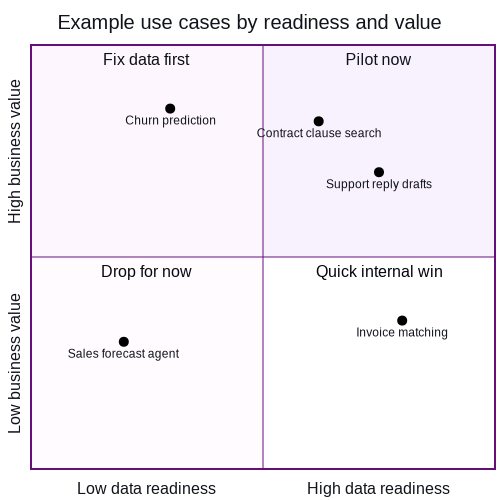
High-value use cases with weak data, like churn prediction in this example, aren't rejected. They become data projects with a named owner and a date to score them again.
What should happen after the assessment?#
Fund the one or two use cases that scored ready, give each blocked one a fix list, and prove the leading candidate in a short pilot judged against a baseline.
Our AI Strategy practice runs these checks before any roadmap is set. It scores each candidate on value, frequency, data access and risk against a measured baseline, then decides build or buy and checks data readiness. It ends with an AI governance policy (approved tools, data rules, review requirements) and a 90-day roadmap with owners, milestones and stop criteria. A typical sequence looks like this:
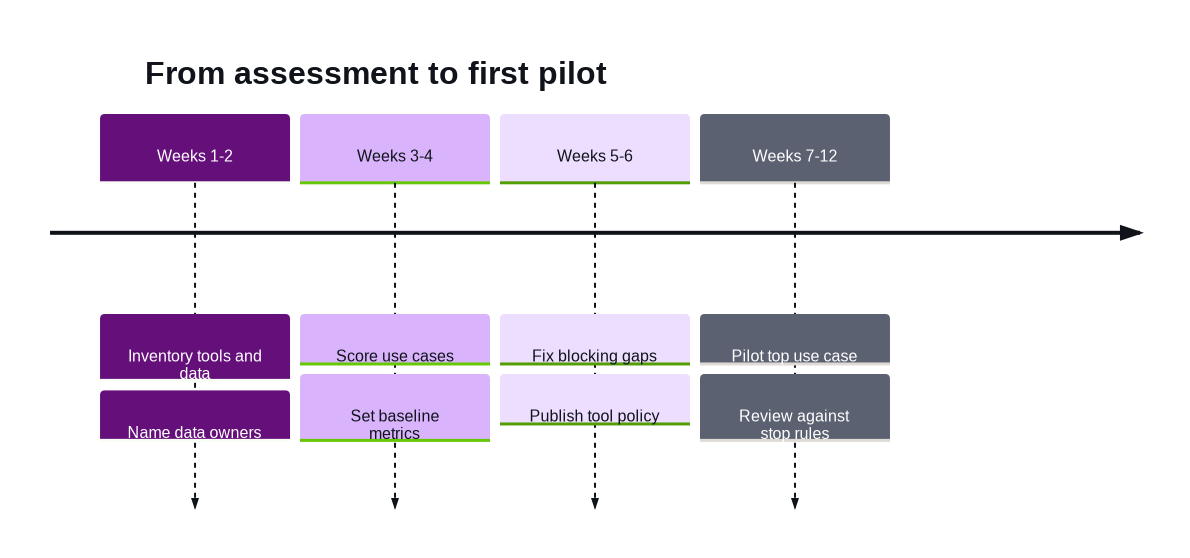
The pilot should be small and specific: one team, one outcome, with success criteria agreed before work starts. That's how we run every engagement, starting with a paid pilot judged on working software. For more on building the plan, see our enterprise AI strategy and 90-day roadmap guide.
Conclusion#
Being "ready for AI" isn't a company-wide state. It's a property of each use case. Before you fund a build, find out where its data lives, who owns it, whether you may use it, whether it's clean and fresh enough, what tools people already use, and who signs off. Score each check, let the weakest one decide, and pilot only what passes.
Want a second pair of eyes on your shortlist? Talk to an engineering lead →
Frequently asked questions
How long does an enterprise AI readiness assessment take?
That depends on how many use cases you assess and how easily you can find data owners. Assessing a shortlist of three to five use cases is usually a matter of weeks, not months. It runs faster when each dataset already has a named owner and the systems are documented.
Should we assess the whole organization or individual use cases?
Assess individual use cases. A company-wide maturity score is hard to act on, while a per-use-case score tells you exactly which data, permission or policy gap to fix. You can roll the results up into an organization-level view afterwards.
What if our highest-value use case scores poorly on data readiness?
Don't drop it. Turn it into a data project with a named owner, a fix list and a date to score it again. In the meantime, pilot a use case that's already ready, so the organization learns how to run AI in production while the data work continues.
Do we need ISO/IEC 42001 certification before building AI?
No. ISO/IEC 42001 is a framework for running an AI management system, and certification is optional. Many organizations use it, or the NIST AI RMF, as a structure for their policies and evidence without seeking certification.
How do we handle employees already using unapproved AI tools?
Start with an inventory rather than a ban. Find out which tools are in use and for what. Then approve, replace or block each one, and publish a clear list of sanctioned tools with data rules so people have a safe option for the work they're already doing.
- AI readiness
- AI governance
- data governance
- enterprise AI
- AI strategy
Newsletter
Get new articles by email
A short monthly round-up of what we've written on engineering pods, quality and AI. No spam.
